
Linux FAQ
Do Ubuntu 22.04 / 24.04 need an extra environment variable?
No GLIBC_TUNABLES setting described here is needed. The current release has been tested and runs normally on these systems.
Can I use Ubuntu 26.04?
The application can run, but Word, Excel, and searchable PDF export need an extra launch setting. Read the Ubuntu 26.04 notes, including the security impact.
How is searchable PDF different from image-only PDF?
A searchable PDF includes an OCR text layer alongside the page image, usually allowing search, selection, or copying. The PDF export limitation described here concerns searchable PDF and should not automatically be applied to image-only PDF without an OCR text layer.
Can I set the environment variable globally?
This is not recommended. Set it only for CZUR Image+, preserve existing settings, and do not change /etc/environment or disable system security.
Why does export still fail after editing the launcher?
Check that the old application instance has fully exited, that you are using the edited launcher, and that existing environment variables and %F / %U were preserved. A per-user copy with the same name takes precedence over the system launcher, so check for a user copy if you edited only the system file. Verify the terminal command before troubleshooting menu entries or pinned icons.
When is Red Hat / RPM support planned?
The target is early December 2026. Adaptation is still in progress; the final date and distribution scope will be announced separately.
What if I need a Linux ARM version?
The current Linux package supports amd64 only; an ARM64 (aarch64) package is not currently available. If you use an ARM device or hope to use CZUR Image+ on one in the future, please email imageplus@czur.com and tell us what you need. You are welcome to include your device model, Linux distribution, and intended use case.
Every message helps us understand real-world needs and prioritize the right adaptation work. We would be happy to help move Linux ARM support forward in response to your needs. Thank you for your interest and patience—we hope to bring you a suitable version as soon as possible.
How do I report a problem?
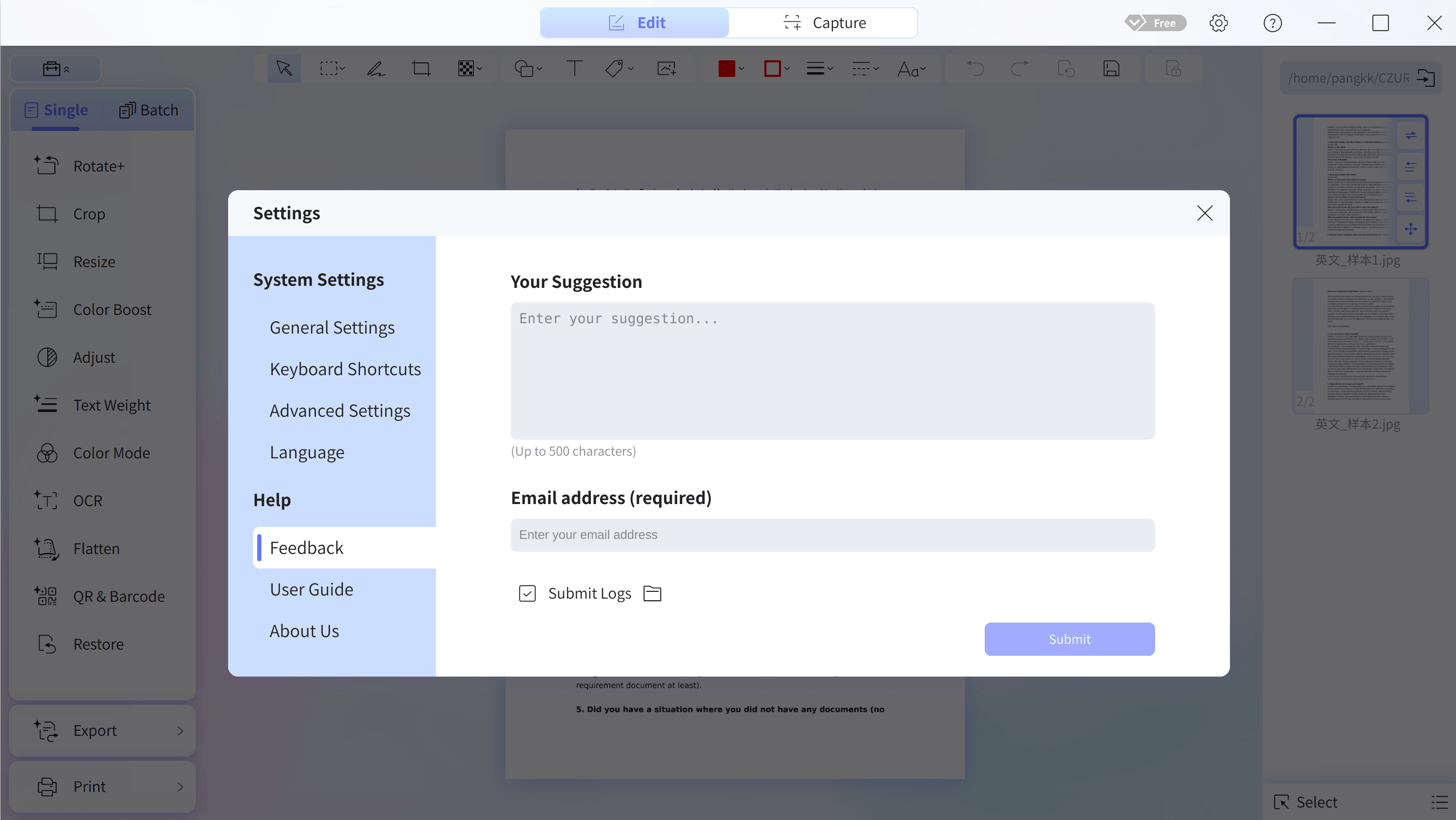
- Open Settings → Help → Feedback in CZUR Image+.
- Describe the problem in Your Suggestion (up to 500 characters) and enter your email address in Email address (required) so support can contact you.
- To include application logs, select Submit Logs.
- Click Submit to send your feedback.
Include the following details when describing the problem:
- steps, export format, observed behavior, and error text;
- whether you applied the Ubuntu 26.04 setting and launched from a terminal or menu.
Do not send credentials, sensitive documents, or unredacted logs. Keep original materials safe and reproduce with a copy.
Documentation updated: October 21, 2026. Applies to the current Linux Debian package; refer to the release package for its exact version and architecture.